
For an entire solar cycle, about 11 years, I’ve been playing with the radio as AF7NX, the call sign given to me by the FCC in 2015. I’ve always been curious about what is on the air, different modes, strange looking signals and how to decode them. Much of my early exploration of HF was just figuring that out, and it doesn’t stop. New things keep popping up to keep you on your toes. I’ll discuss some of that here, and other aspects of playing radio for the last decade.
When I started, the last solar cycle was coming to a close. By the time I had a decent antenna in the air, late in 2015, the average solar flux was on its way down to 100 sfu (solar flux units), where the color of the propagation gauge that I watch changes from green to orange. Once it dropped into the orange, it was destine to stay there, on average, for the next 6 years. What this means is that the upper bands become unusable. The 12 and 10 meter bands drop out completely except occasionally after rare solar storm activity. On the other hand, the low bands wake up a little. With the sun less active the ionosphere settles down a little and it is less noisy on the 160 and 80 meter bands.
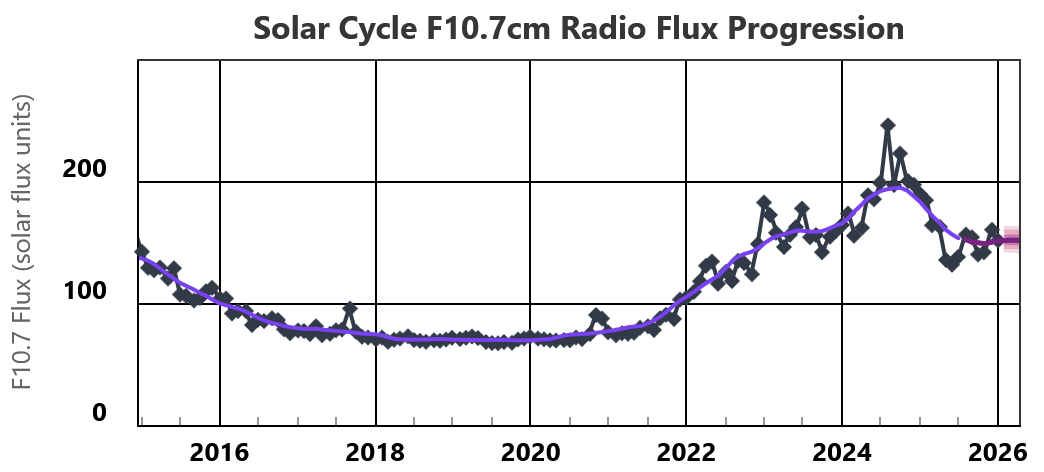
The plot above shows the solar flux. One thing to note is that even during solar minimum and no sun spots on the sun, there is some solar flux, just not enough to create the ionospheric plasma density necessary to reflect any radio waves above about 18 MHz. It is against this backdrop that you have to think about what antennas to deploy and how to use the radio station. When the solar radio flux is low you may be limited to more regional communications on lower bands and with poorer listening quality.
I looked back at my log to see on what bands I made the most contacts outside the United States (DX QSOs), comparing the years of solar minimum with the last few years near solar maximum. Radio contests are restricted on the WARC bands, shaded in the table below, so those bands will have somewhat fewer contacts in general.
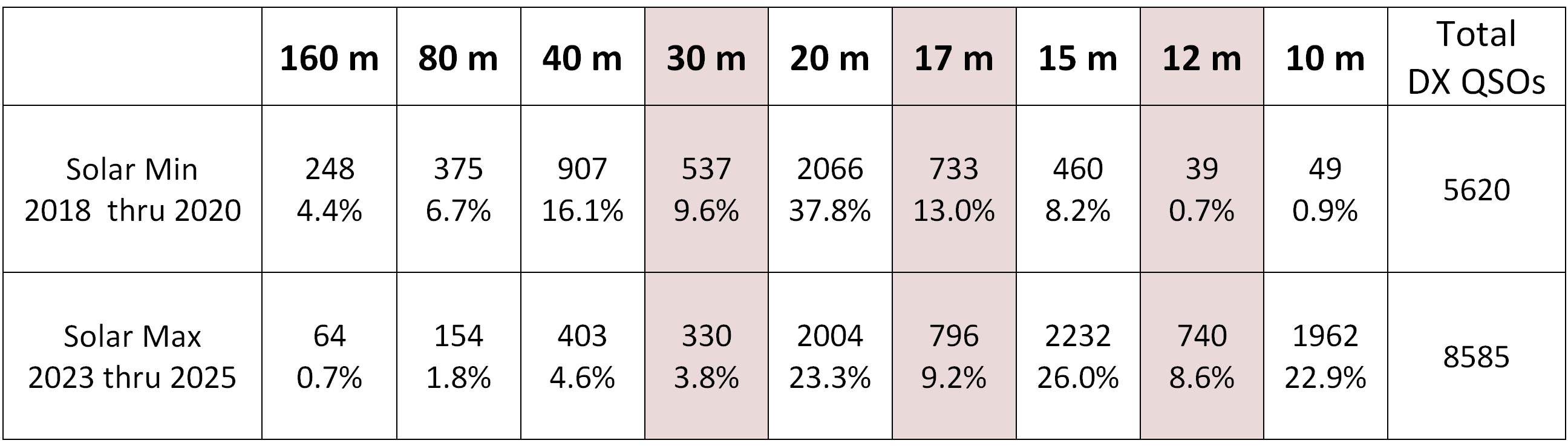
There is just more activity on the radio when there is ample solar flux, with a distinct shift toward the bands above 17 meters. During solar minimum, the 20 meter and 17 meter bands are still quite productive for DX contacts.
Phone SSB
When you start out, the easiest thing to do is to listen for someone on the air, press the mic key and talk back. That is, unless you suffer from mic fright, a fairly common condition for the newly licensed. One way to help you get on the air is to respond to “nets,” with a “net controller” who helps route the conversation between stations. Local community nets are a good way to get to know hams in your area, often with just a “check-in” and a chance to say a few words to your neighbors. Directed nets are common, and serve a useful function, but I find less formal nets gatherings more to my liking. Here in Eugene we have an evening “Sunday Schmooze” on the 10 meter band where we just talk about our week and whatever is on our minds. Ten meters does not go very far at night; this is a local net that is also accessible to Technicians who have privileges on this HF band space.
There are a few regional “rag chew” groups as well. One of my favorites is the “Street Corner” that meets up on 80 meters in the summer and 160 meters when it gets darker. This group is concentrated in the Seattle area, but there are folks throughout the Pacific Northwest and California that show up from time to time. Friendly groups like this can help you understand how well you are managing to get your signal out, how your audio sounds, etc. as you learn to operate your radio on single side band (SSB).
In the summer here, the 20 meter band is often alive with European and Russian stations well into the evening hours. My hex beam antenna really helps working these stations. Making casual DX phone contacts can be very satisfying.
FREEDV
The talented ham radio community doesn’t sleep. One new thing on the block is digital voice technology. There have been commercial products that do this, especially for VHF. Open source FREEDV has been around for over a decade, but only recently has it made strides with its Radio Autoencoder (RADE) that make it an exciting voice communication option for the HF bands.
The following table is a guide to the various FREEDV HF modes that have been developed over the years, using analog single-side-band (SSB) and Skype as anchors for a rough guide to audio quality.
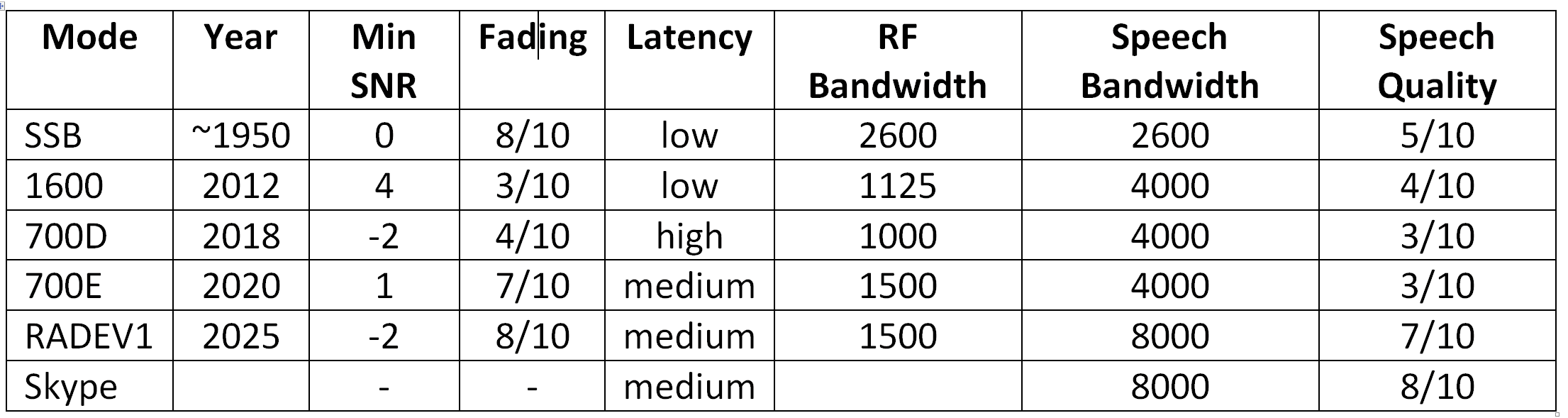
Digital voice uses a computer sound card system to run an audio headset for the audio in/out. The magic is that the audio is turned into a digital data stream before being transmitted. The audio is retrieved from the received digital signal. The result can be significantly less noise using a narrower bandwidth radio transmission.
With the RADE version there is finally a significant advantage in many situations for the digital voice technology. From what I can see, the primary weakness is that it does not fail gracefully, dying into the noise as does single-side-band does. Rather you will have perfect copy and then it will just disappear. But if the signal is good enough, the audio is amazingly clear and free of background noise. FREEDV seems like a platform that is destine to grow a large user base. The application has been well thought out, and the advantages over SSB mean that there will be more adopters. Undoubtedly the developers are continuing to refine their technology. The growth will feed on itself, much as has happened with FT8 and to SSB itself, when you recall the AM modes that preceded SSB.
Digital Modes
If you spend any time dialing through the ham bands, you will immediately discover that there a lot of signals that do not contain any human voice. Part of becoming a competent operator is being able to recognize and decode the myriad of digital signals sent over the air waves. Digital transmissions have several advantages over voice or simple Morse Code modes. The signals can be tailored to have a narrow bandwidth, with correspondingly higher signal content over that bandwidth, and S/N (signal to noise ratio) much better than voice modes. There are also many ways to code information into the modulated signal; frequency coding, phase shift coding, using multiple tones, and so forth. In the decoding process the signals are turned into digital representations of the signal. Once you have numbers, the computer can do a lot of processing on the way to providing human readable output. Common techniques include error detection and correction methods, time averaging, redundant transmission of the data for correlation and correction, looking for correlation with expected responses, and just about anything else you can come up with. Obviously you need special software to do this. I use two digital-mode software packages when working digital character modes.
FLDIGI
FLDIGI is a very versatile program, built over the years by David Freese, W1HKJ. It has “modems” for many of the digital modes that are out there all in one place. The software is stable and also includes logging capability, and hardware compatibility with many transceivers and computer operating systems. The popularity of the various digital modes have waxed and waned over the years. When I started in 2015, PSK-31 was still very popular, but on the wane. There was also quite a bit of activity on the OLIVIA and MFSK modes. To remind myself of why I liked those modes, I just did a quick listen, found a PSK-31 station for a quick QSO, and then went over to 80 meters and discovered a daily evening net using OLIVIA 16-1000. So these modes are still viable and can be a lot of fun. It is radio “chat,” where you can type messages to send back and forth. The speed of transmission is roughly “typing speed,” depending on your typing skill and the particular variety of the digital mode. A common practice is to use macros with common bits of information like your name and location, maybe something about your setup, confirmation information and hello and good byes. FLDIGI lets you customize these macros which makes it easier for you to spend more time with personal communications.
With all of the various digital modes, many looking and sounding similar on the waterfall, it can be very difficult to know which mode you are listening to. Fortunately you can turn on the TxID and RxID feature that will help get your party on the right mode. If you turn on TxID then just before your main data transmission, a short block of data is sent in a universally understood form that specifies the mode that will be used in the message body. If you have RxID turned on, and your radio receives the TxID from a sender, FLDIGI will switch to the correct mode and center reception on the data stream.
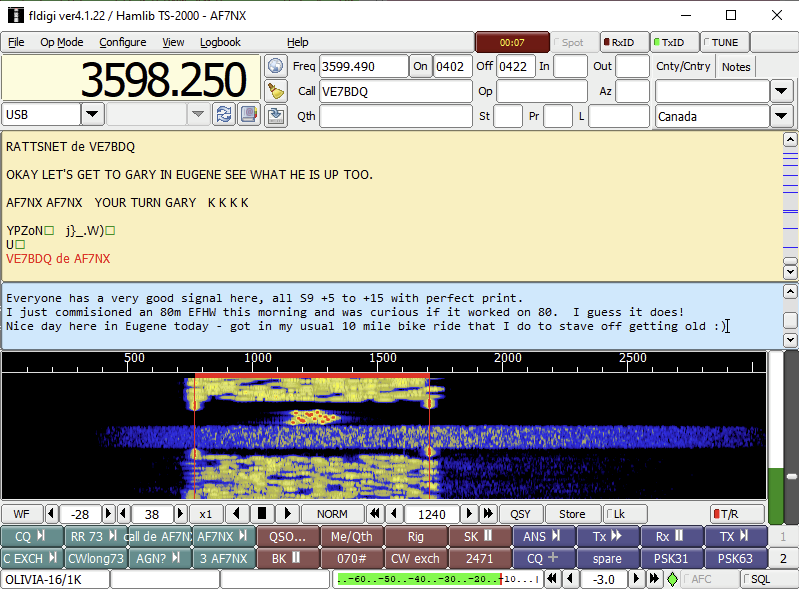
I find a good approach for communicating efficiently with these typing modes is to type ahead your message in the blue box while the corresponding station is transmitting. When they are complete you can initiate the transmit with a mouse click and your text will move from the blue type-ahead box and become red text in the dialog box above it.
The OLIVIA variety shown in the image is OLIVIA-16/1K, which means there are 16 channels space across 1K of audio spectrum. This is a good variety with a pretty quick character speed for chatting. If conditions are less favorable then OLIVIA-8/250 is much slower but has much better noise performance, to the point that the signal can be barely visible on the waterfall and you will still get good copy, albeit at a glacial pace.
FLDIGI has some modems for signals you will find outside the ham bands as well. One of the most interesting is the WEFAX modems that can be used to generate the images sent by weather fax stations around the world. This is probably one of the more useful things I can do with my radios. As the pages and images come in they are automatically stored in a folder. I can run one of the SDR’s just looking at a WEFAX station and always have the most updated weather info available.
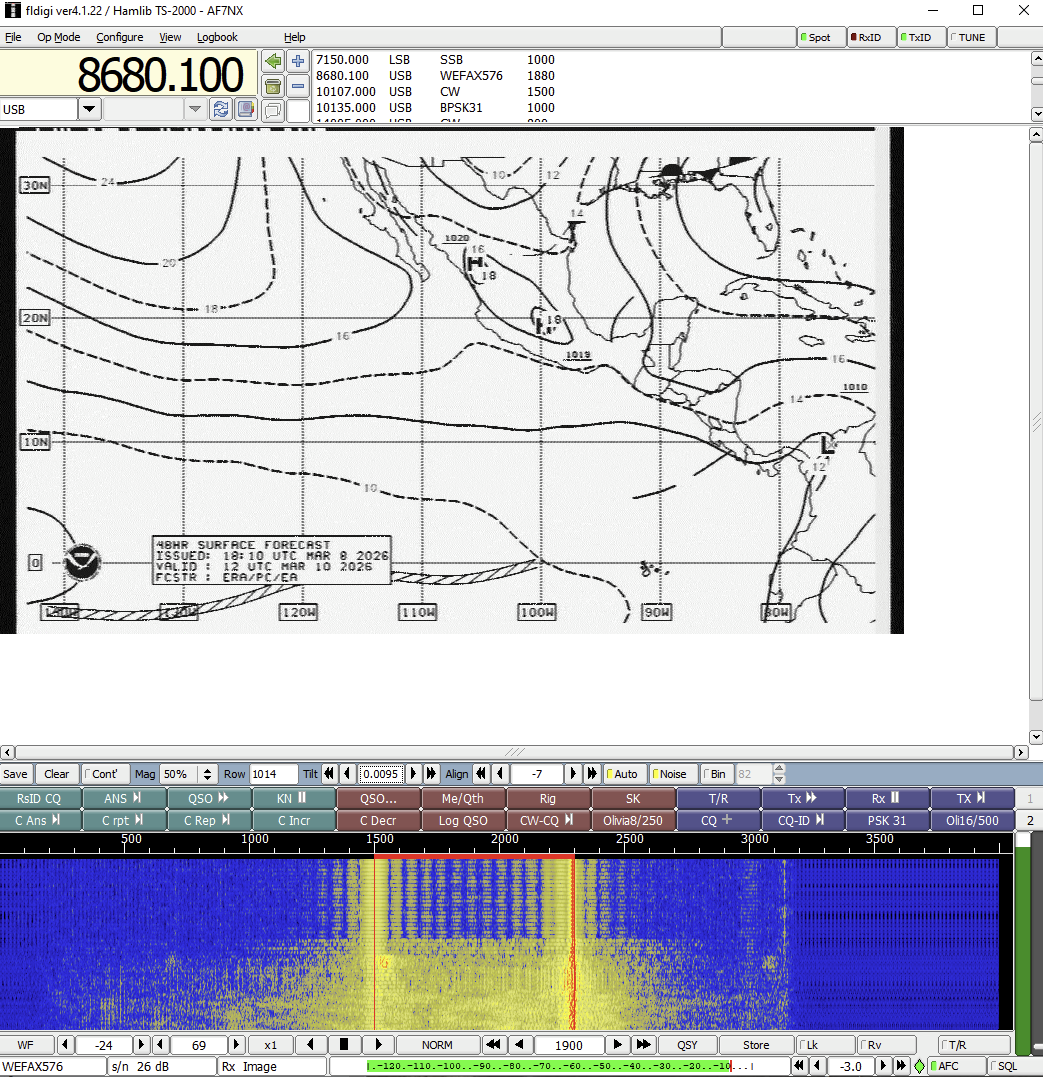
Apparently FLDIGI can also send images using the WEFAX modem. I have not tried this yet, but might be fun to send your latest schematic drawing to friends via their HF radios.
WSJT-X
The FT8 protocol has become very popular since it was introduced in 2017. This is by far the most popular protocol of the weak signal modes pioneered by Joe Taylor, K1JT. The WSJT-X software supports several of these modes including the older JT65 and JT9 modes that were popular when I started in 2015. New hams are drawn to these modes because they are so easy to use and make contacting DX stations much more likely with sub-optimal stations than would be possible with SSB phone contacts. FT8 sends only a few characters of information during a 13 second interval with 100% power duty cycle and only 50Hz bandwidth. With signal processing, successful decodes are possible when the S/N <-20dB compared to noise on a 3kHz bandwidth. The noise performance is better than CW and does not require a new ham to learn the Morse code.
Over the years I’ve used many of the digital modes, either for conversation and rag chews, or to make DX contacts. I now regularly monitor FT8 signals using a “bandhopping” feature in WSJT-X that allows the program to cycle through bands you have selected. WSJT-X also will send spots of stations you receive to the PSK Reporter website.
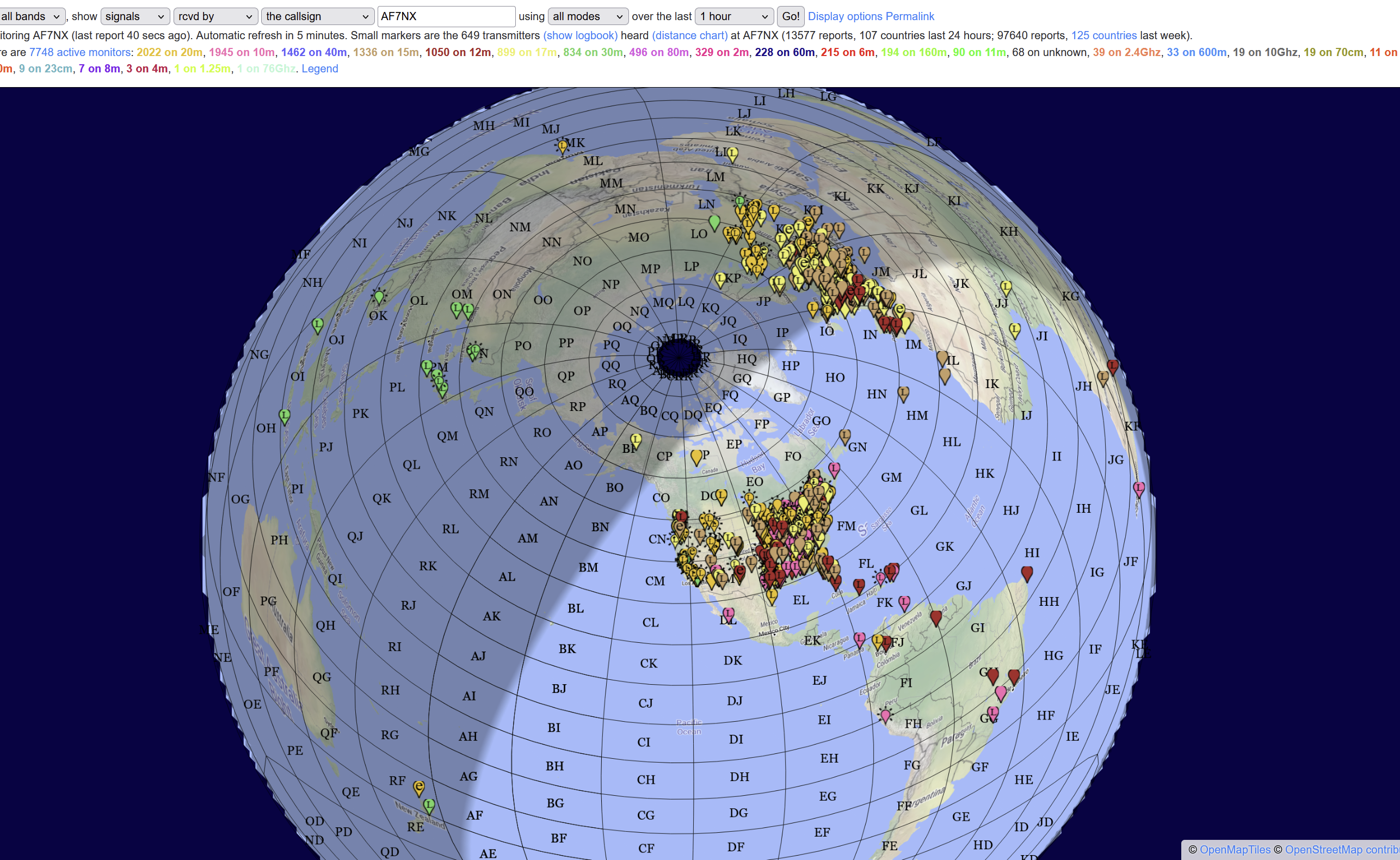
As the day progresses you can watch as one band gives way to another. If you are playing the DX game, looking for a contact in Eastern Europe and there are no spots on any band from Europe, you might want to go read a book rather than play radio! I gauge general propagation conditions by the total number of received spots I’m seeing an hour. If it is above 1000 spots/hour, that is usually a pretty good time to be on the air.
Winlink and Vara HF
I haven’t spent a lot of time with this digital mode, but it should be included in this discussion. Winlink is basically a radio e-mail network messaging system. One of the common “modems” is VARA HF which will send messages over an HF channel to other stations listening on the network. The Winlink system can exchange message on the internet as well, so this system is a bridge between HF networks and the internet. Many mariners like this system to relay messages where there are few alternatives.
Morse Code CW
As I mentioned before, I never bothered to get my license in my younger years because I didn’t want to to spend the effort learning the Morse code, which was then a requirement. I still resist studying, but I’ve come to appreciate CW and now enjoy working CW with much satisfaction. So what happened?
It didn’t take long for me to realize that with some DX stations you will only manage to make a contact if you use CW. There were a lot of signals at the bottom of the ham bands using dits and dahs. I discovered that FLDIGI had a CW decoder as one of its modems. I started listening. I got curious. Relying almost entirely on the FLDIGI decoder I made my first CW contact, using FLDIGI to send my call sign and confirmations. The important thing was listening, because very soon I could “hear” my call sign and the banter of the DX sending his “5NN” and “TU”s, even if I could not hear the individual letters. I’ve been doing this now for ten years and I “hear” much more of the vocabulary and individual letters. I still have a ways to go, but for an old guy who hates to study, I’m pleased with my progress. I still use the computer to key the message when sending. I’m sure if I spent more time with the CW paddles the learning process would accelerate; that is just the way the brain works. Working contests can lead to improvement quickly and be a lot of fun. Listening all the time to transmissions “at-speed” is the key to hearing the letters and not the dits and dahs. Before you know it you have a hundred countries for your CW DXCC.
A couple of years ago I went a step further on the software front and started using CW Skimmer, by Alex Shovkoplyas VE3NEA. Alex and his Afreet Software company has contributed mightily to the ham radio community, with among other things, his OmniRig software package for computer communication with many different radios. CW Skimmer can simultaneously decode dozens of CW streams, it will displays call signs it discovers for the streams, and watches for “CQ”s and the classic “5NN” acknowledgement. All this information, for a broad swath of frequencies, makes it possible to work much more efficiently during contests. The “5NN” acknowledgements allows you to discern where DX stations working a pile-up in split mode are actually listening, so you can position you transmissions where you are more likely to be heard.
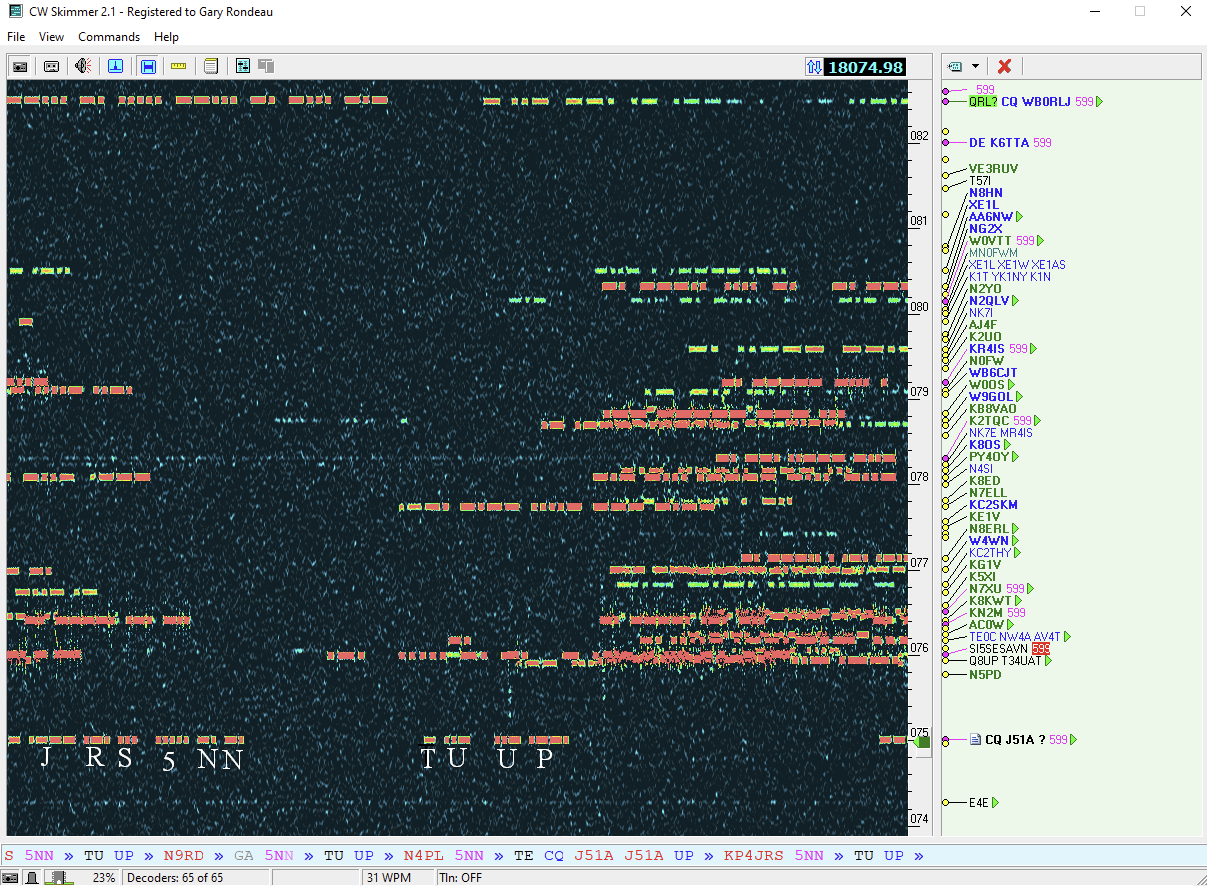
Decoders are not perfect. In fact they fall quite short of a well trained brain. This is especially true when there is “warble” on the signals, common with ionospheric instability. In those instances, the brain seems much better than the decoder. Curiously, I’ve noticed that my eyes can recognize the characters better than can my ears or the decoder when the signals are distorted. The process of picking out calls in these conditions really accelerates the learning process, for someone who doesn’t like to study! So don’t be intimidated by CW. Put on the ear phones, turn on a decoder, and start making contacts. Before you know it, you will know your own call sign and the banter that is typical of a contest or a DX operation, and soon thereafter will come the rest of the alphabet. The goal is “head copy,” where the sound translates to a letter without any distracting dits or dahs. I’m still not there, but with every contests I get just a little bit closer.
Chasing DX
Those new to HF radio are enamored by the fact that you can find radio contacts just about anywhere if conditions are right. Typically one of the first things new hams want to do is to Work All States (WAS) or work 100 DX entities (DXCC). The American Radio Relay League (ARRL) has awards for these and many other accomplishments. Earning WAS and DXCC awards rightfully bestow a level of competence upon the recipient. But of coarse it doesn’t stop there. Can you get all of the states and 100 countries just using phone (SSB) or just using Morse code (CW)? Can you get to 200 countries? The competition is mostly with yourself, with the satisfaction of knowing that to accomplish your goals you had to overcome some technical and practical hurdles. Your antennas have to be pretty good, and you might need to make some CW contacts, etc.
I like to chase DX. There is a year-long contest call the DX Marathon where the goal is to make contact with as many DX entities as you can every year. There are about 340 official DX entities. These include what we consider “countries,” and also entities that are separated by a distance from the country, for example Alaska and Hawaii are DX entities. Of these, perhaps 200 entities can be heard relatively easily over the coarse of the year. There are many islands and remote or hostile locations that are very rarely heard from. The rarest of them all is North Korea where a repressive regime outlaws amateur radio. Remote islands are visited from time to time by DXpeditions, groups of hams with radios and antennas ready to activate a rare entity. Once on the air, the pile-ups begin with hams everywhere trying to make the contact with the rare one.
Spotting
In order to work the rare DX station you have to know that there is someone out there listening for you. The internet gave rise to “spotting” networks, where if one ham makes a contact with a rare station, he can post the DX call and frequency to the spotting network where other hams can see it and go find the rare one. There are automated systems for spotting as well. Thousands of stations send their reception reports to PSK Reporter web server every few minutes, so the PSK Reporter map will show any station that someone is hearing. This is most useful for the FT8 and FT4 Modes, but it will show spots of CW and other digital modes as well. There is also the “reverse beacon network” (RBN) which is a network of stations listening using CW Skimmer and sending spots to the RBN network. This is particularly good for CW spots. These spotting tools allow you to filter the flood of incoming spots down to just what you might be looking for.
Perhaps the easiest and best spotting tool is to use JT-Alerts using your own reception reports from FT8. JT-Alerts is a helper program that watches all of the reception reports coming from WSJT-X when you are listening on FT8 or FT4. Again, you get to select which spots about which you would like to be notified. In real time, when something you need appears, JT-Alerts will notify you so you can make the effort to make the contact. Combined with band-hopping, this method can watch a lot of stations go by and help you grab the needle out of the haystack.
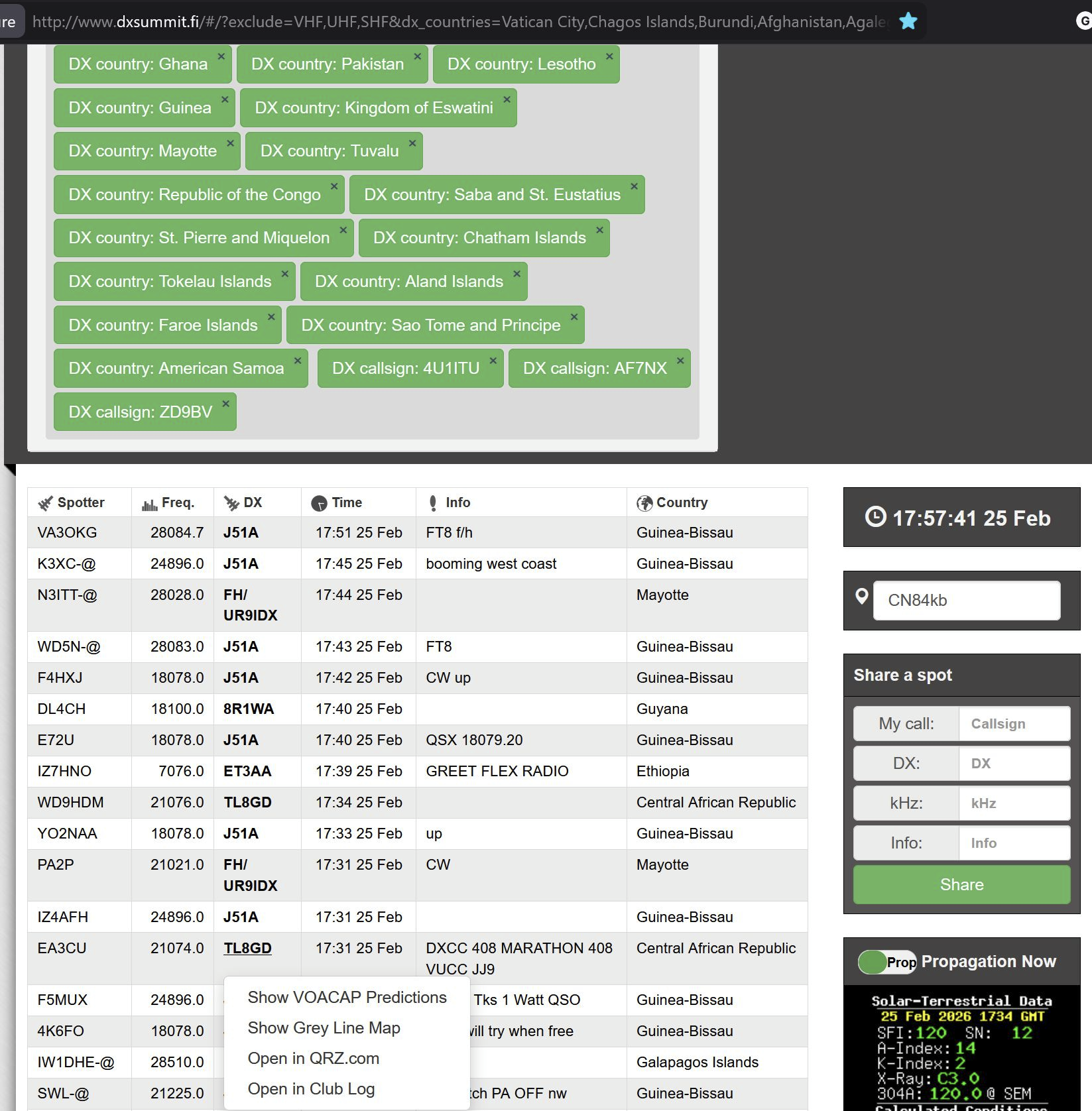
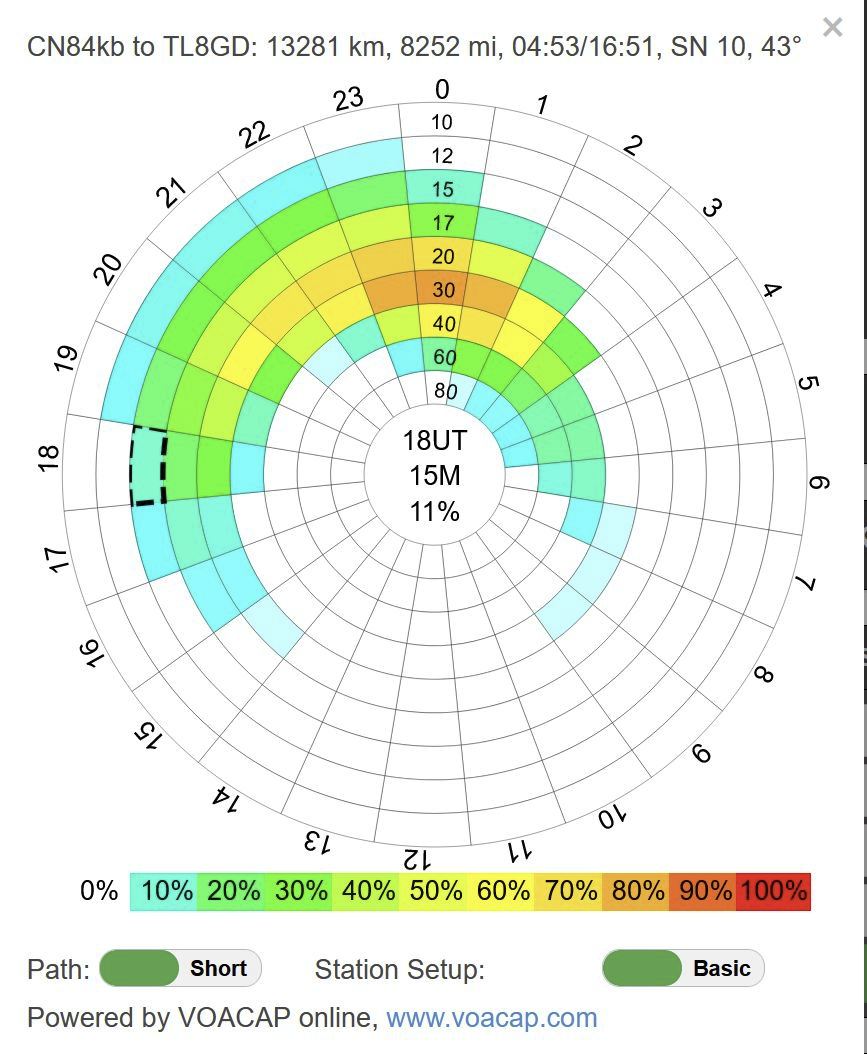
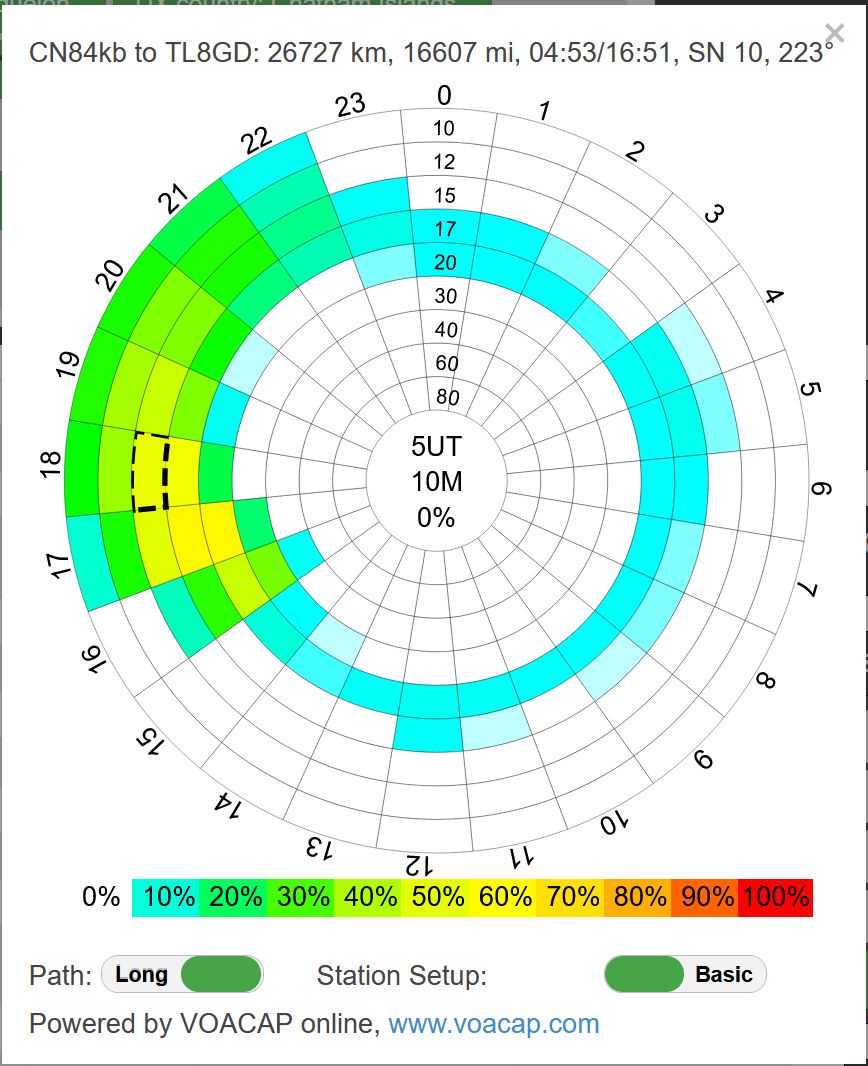
There are some particularly good web-based spotting tools as well. The one I use is DXsummit.fi out of Finland. You can set up a list of countries and call signs as part of the URL when you call up the website and you will just see spots for these wanted entities. Additionally, it supports a VOACAP look-up. VOACAP is a propagation tool developed over the years originally by Voice of America (VOA) that can be very helpful in accessing propagation possibilities with distant places. Clicking on a DX call sign will give you the option to bring up the VOACAP report based on current solar conditions. Then you can check if long path or if short path propagation holds out the most hope, or whether there is really no hope.
Tracking DX opportunities
Serious DXers know what is expected to be upcoming on the bands. DX-World.net is the best website that aggregates information about upcoming DXpeditions and individual operators that happen to be planning to visit exotic places. Some places on the planet are very hard to contact during parts of the year. In general locations in the northern hemisphere are easier to contact in the spring and summer on the bands above 14 MHz. In the winter, the lower bands, particularly 30 and 40 meters , can get you around the world.
Some rare places have year-round residents that occasionally get on the air, but where there are only occasional organized DXpetitions. These are often the most challenging countries to contact every year for the DX Marathon. Bill, C91CCY, lives in South Africa and makes a trip to his place in Mozambique from time to time. For several years he was the only station I heard from there, only phone contacts, and usually on 40 meter; that is a challenge. Paulo, 5X4E, and his partner live and work at an orphanage in Uganda. Some years Paulo is the only station I hear in Uganda. Africa is often challenging to find someone in every country every year.
Contesting
Every time you hear your call sign coming back to you from some far away place, you get a little jolt of endorphins and a smile on your face. It can be addicting. When an occasional call isn’t enough, then it is time to get into contesting. Who would have thought that there could be such a thing as Radio Sport, but there is and it has a life of its own. For most of us, we are competing against ourselves as we try to improve our own equipment and operation skills. Contest results become a metric. At the apex are stations and operators that are the ultimate in HF communications capability and ability. And there is everything in between then and the beginner.
In its simplest form, a contest is just an appointed time for operators to all get on the air and try to make contact with each other, those making the most connections are the best. There are many variations on the theme. Some contests are just for voice (SSB) contacts, others just Morse code (CW), or RTTY ( a digital mode). Geographic regions may be emphasized or limited. Scoring typically emphasizes collecting a multiple of varied locations, many foreign lands for DX contests or the many states and provinces for more regional contests. There are contests just for “top band”, 160 meters, and just for the 10 meter band. Some contests last an entire weekend, others just an hour. The DX Marathon lasts the entire year. With all of the variations possible, there are quite literally contests happening every day somewhere with some mode and frequency. Within contests there are categories for different kinds of operations. Power level used, number of operators, use of “assistance” in spotting or decoding transmissions, even types of antennas used can generate specialized categories so that operators can more closely compare themselves with others with similar equipment and operations.
I got hooked pretty early on. I recognize a slight competitive streak in me. It is a badge of pride to develop your station and skills to the point you are competitive with the best of your neighbors. For me it is also fun to do this while using inexpensive old radios and homemade antennas made of bits of wire and bamboo. I keep an Excel spreadsheet of all my contest results over the years. Among the things I watch is my error rate over the years. When I started with CW contests my error rate was more than 10%; today it is less than 3% even though I’m working more difficult contacts. Another metric is the QSO rate. When I started it was one QSO every 5 minutes or so on average. Now down to about 3 minutes between Q’s – still way too slow to be really competitive!
There are two ways to play the contests game. You can listen for stations calling CQ and answer them, referred to a search and pounce (SP), or you can call CQ and let others find you, referred to as running. Running can be very productive, especially for powerful stations. The little guys, me included, do mostly search and pounce. For CW contests, playing SP gives you a chance to listed to the target call sign a few times as you try to figure out what it is before you answer. If you are running, things can happen much more quickly and you need the skills to respond quickly as well. For me to get better contests scores I am at the point I need to do more running. There are always improvements to be made!
Listening
My radio is always listening to something. Usually it is cycling through the FT8 bands just in case some rare DX decides it is time to call. I might not be there, but I’ll record the occurrence with JT-Alerts and know to watch for them in the future.
Often, if I see a lot of digital mode activity, I will park on the appropriate band segment and let FLDIGI record anything that shows up. Using the RX-ID function, if the station send the mode ID, FLDIGI will center on the transmission and start recording what it hears without any operator intervention. This can give you and idea of who and when interesting conversational mode digital stations are about.
Much of the listening is all about testing antennas. I will set up two receivers on two different antennas and listen to a days worth of FT8 signals to do a valid comparison between them using the allplot software.
Or I can be picking up the weather faxes in case I don’t believe what my cell phone is telling me.
Remote Operation
I’ve been gradually doing more “remote operation” when running FT8. I put remote operation in quotes, because most often it is just remote from the shack in the basement; instead I’m in the easy chair in the living room with my laptop, but the concept is the same as if I was on the other side of the world. Remember, I just have my 40 year old radio with an SDR panadapter, being controlled by HDSDR from the shack computer. I turns out that there are very few knobs or switches necessary to operate on any of the seven bands of the hex beam antenna. Playing FT8 means just picking the target station, choosing your TX audio offset, and hitting the ENABLE button. The simple interface means that any “remote desktop” program can be used to run the radio. I usually use Google Desktop, which is the easiest to get to work. I’ve also used the NoMachine interface. Once you have figured out Google Desktop, it is pretty easy to check on your radio with a laptop while you sip your breakfast coffee. You can install Remote Desktop on an Android phone as well.
Perhaps the most notable remote operation contact I have made was while vacationing in Baja a couple of years ago. We were staying on a beach with no phone or internet, but occasionally a sailboat would anchor in the bay and allow us to use their Skylink. So my Android phone, via WiFi to the sailboat’s Skylink, talked remotely to my home computer which ran the transceiver to make an FT8 contact with IH9YMC on Pantelleria Island in the Mediterranean. It boggles the mind!
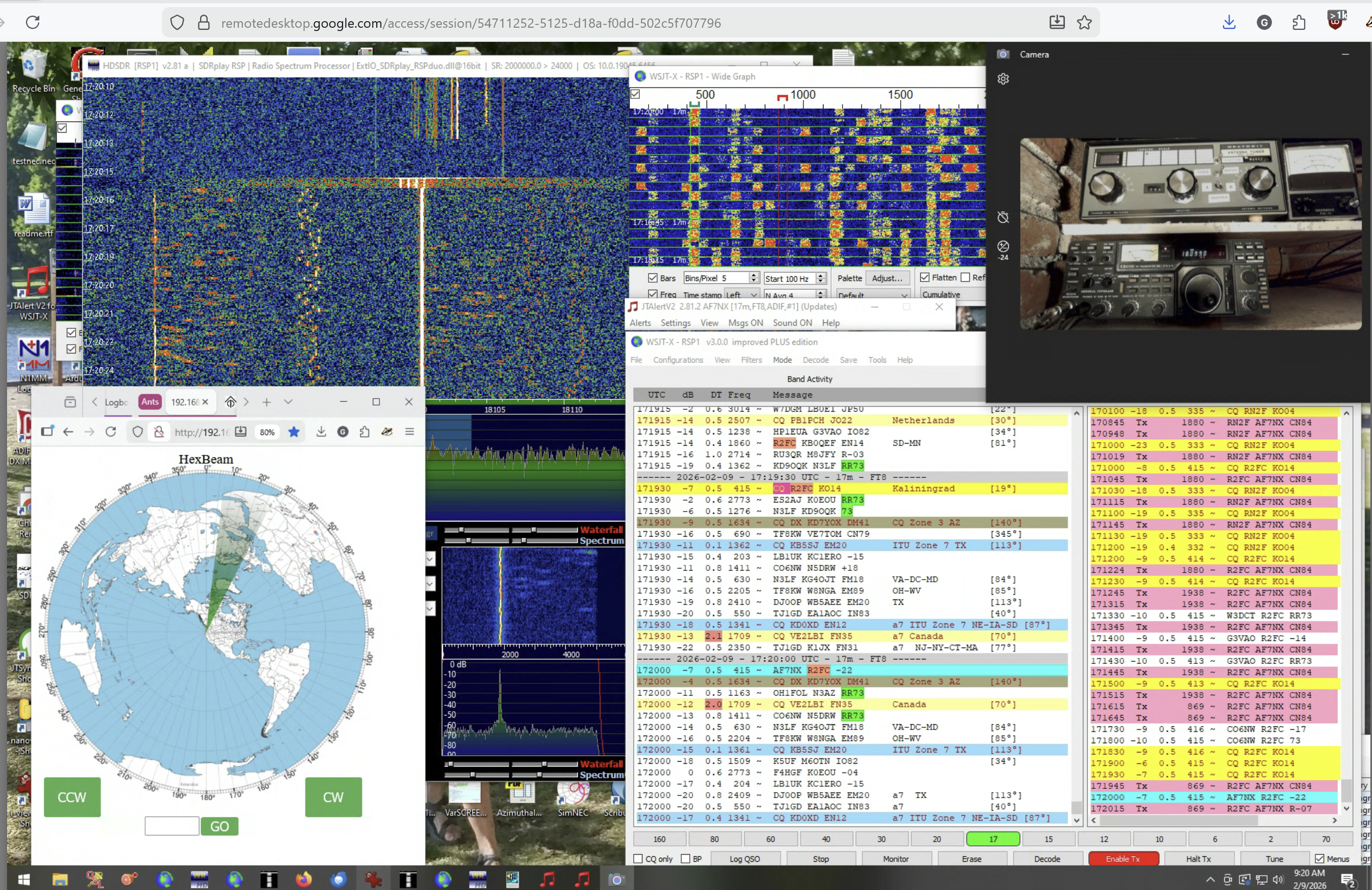
Don’t be complacent. If you are a few feet away and something goes wrong you can smell the smoke and go put out the fire. It is not so easy if you are in another state. My fail safe precautions include a WiFi “Smart Switch” on both the radio AC power and the computer power. I also monitor the HDSDR waterfall which will show the TX waveform. Sometimes I will arrange a video camera to show the radio and the power meters so I can verify expect operation when transmitting. In the remote desktop screen shot below you can see the camera monitoring the radio and power out meter, HDSDR during transmission with the transmission spectrum visible, and the antenna control browser pane with the antenna aimed at Europe where I was working. The screen display on the laptop is a little cramped but easily workable. Using the Remote Desktop app on a phone takes a little practice and patience, but you can make FT8 contacts that way if you really need to.
There was one instance when I needed to use the WiFi power line kill switch to turn off a run-away transmitter. I can’t recall what the matter was — but bad stuff can happen and it is good to anticipate what to do if it does. Modern radios can make this all much easier with more capability and direct internet and digital audio connections. But relatively simple operations like FT8 lend themselves to easy remote operation even using 40 year old radios.
 Squash Practice